With Basecast you provide the video that we turn into your next podcast sensation. Do it yourself after downloading the episode with the free Clip Creator tool, post the episode directly to your existing Podbean account with a Basecast Podcaster account, or with a Publisher account we handle the admin on your behalf so you can focus on your content.
The steps are super easy. First upload your recorded video to Basecast.
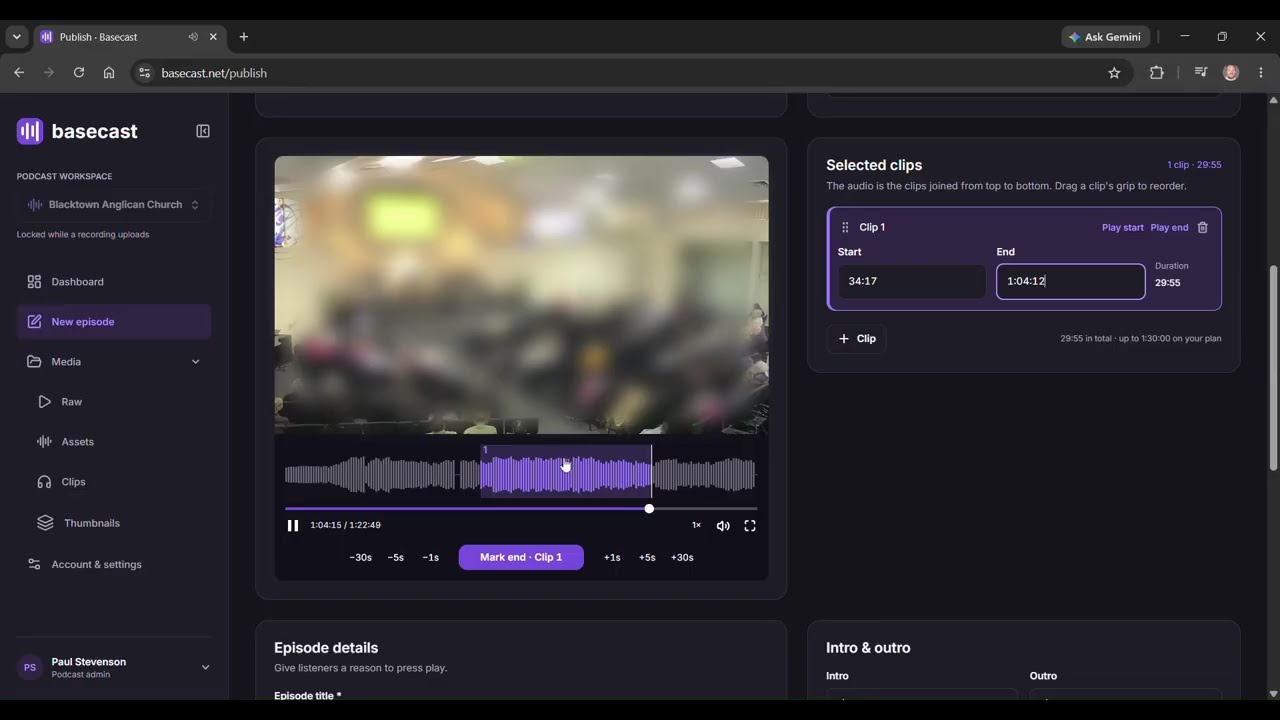
Second, use the clip selector to pull out the specific parts of your video that you want in the episode. You mark the start and end times of one or multiple clips. Use the up and down arrows on your keyboard to tune your selection or hold shift to scan through the video quicker.
The third step is to include intro and outro audio files that Basecast will use as bookends on your episode. Basecast will normalise the loudness and take care of some noise removal.
When posting directly to a podcast host, the fourth step is to add the episode details. These will get passed along directly with your episode. Don’t forget a thumbnail: uploading via Basecast will help you create a square image that is compliant with the main podcast apps.
All that is left to do is submit the episode and the rest will happen in the background. Visit basecast.net today and find out for yourself just how easy podcasting can be.